Check the color of the exhausted toner in the message window of the Control Panel.
Open the Front Door.
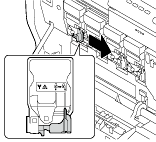
Pull the lever in front of the Toner Cartridge to be replaced leftward.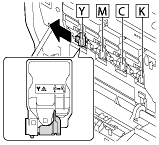
-
Hold the handle of the Toner Cartridge, then pull out it.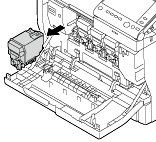
 NOTICE
-
Check the color of the new Toner Cartridge.
 To prevent toner from spilling, do not take the Toner Cartridge out of the bag until Step 4 is executed.
Take the Toner Cartridge out of the bag.
Hold a new Toner Cartridge upside down in your hands, then shake it several times in each of the vertical, horizontal, and longitudinal directions.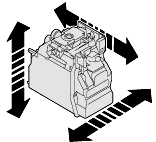
-
Check that the color of the Toner Cartridge matches that of the insertion slot in the main unit, then push the Toner Cartridge to the back.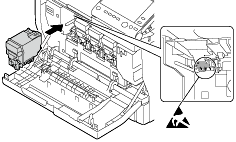
 CAUTION
-
Pull the lever to the right to lock it.
Carefully return the lever at the front to its original position. If the lever is not returned to the original position, the Front Door is not closed.
If it is difficult to operate the lever, push the lever unit to the back.
Close the Front Door.
